Authentication service and Identity provider
Open-source, self-hostable authentication service built from scratch. JWT session management, TOTP 2FA, role-based access control, and a full admin API + Dashboard
Type: Open Source Micro-Service
License: AGPL-3.0
Tech Stack: TypeScript | Node.js | Express | PostgreSQL | Drizzle ORM | Redis
Table of Contents
- The Why
- The Architecture
- Core Features
- Key Technical Decisions
- Database Design
- Security Model
- A Few Challenges I Faced
- What I'd Do Differently
- Outcomes & Takeaways
1. The Why
Authentication is a problem every new project has to account for. However most current off-the-shelf options came with trade-offs of vendor lock-in, pricing per user that scales badly, or minimal control over your user's data.
I wanted to build something I could drop into any personal or small-team project with minimal configuration, and just have it work. My own user data, in my own infrastructure, free forever no matter how many users signed up.
The goal wasn't to reinvent auth for its own sake, but to deeply understand how a production auth system actually works under the hood, how it keeps track of sessions, manages access, and shares auth states with other services.
The core requirements for an MVP:
- Redis-backed session whitelisting and JWT stateless authentication
- Two-factor authentication for increased security
- A role and permission system that can span multiple services (not just auth)
- An admin dashboard to easily manage users and roles
- Rate limiting, CSRF protection, and device tracking out of the box
- Fully Dockerized for easy deployment
2. The Architecture
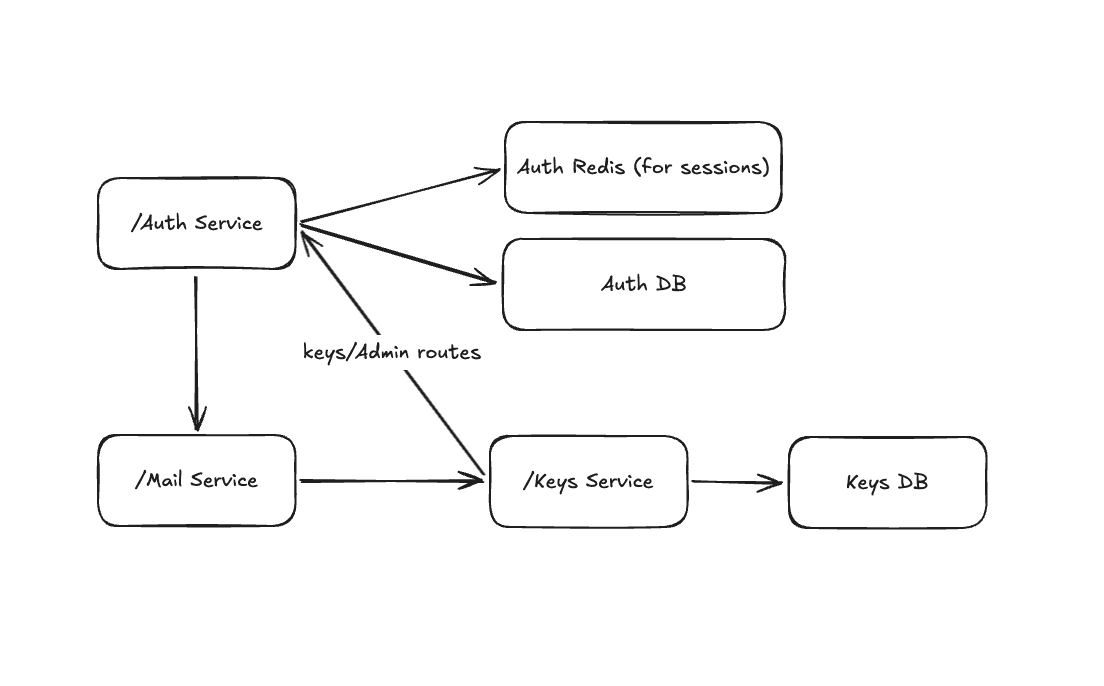 High-level architecture. Auth talks to Postgres for persistent storage, Redis for session whitelisting, and two internal TayLabs microservices (/Mail and /Keys).
The service is structured around three base API routes in Express:
/api/v1/auth/*      - Manages login, signup, refresh, logout, TOTP validation, email verification, password reset
/api/v1/account/*   - Profile, security settings, TOTP management, account deletion
/api/v1/admin/*     - User management, role management, service & permission management
Each namespace has its own routes, controllers, DTOs (with request/body validation via Zod), and service-like use-cases. The controller layer was kept as thin as possible and manages validation, service calls, and issuing the formatted response. All business logic lives exclusively in the service/use-case layer, keeping the code clean and easy to maintain.
The overall structure of this project was inspired by the Clean Architecture principles, though not strictly adhering to them.
3. Core Features
Authentication & Session Management
When a user authenticates with the service successfully, it issues a standard JWT token pair (access and refersh tokens) that are used to access other services in the environment. When accessing a separate service, the access token is validated with the shared secret for a stateless validation, and doesn't require making a request to the auth service each time.
Sessions are identified by a randomly generated session ID stored in a _selected_s cookie. There can be multiple active 'sessions' per device, to allow for having multiple users logged in simultaneously (the foundation is there, it just has yet to be implemented). Each device gets its own persistent device ID cookie (_d_identifier) so multiple active sessions can coexist across devices, and device specific data can be stored incase a user wants to revoke a session for specific devices.
TOTP Two-Factor Authentication
Users can register one or more TOTP authenticator apps. The TOTP secret is generated server-side using otplib, then encrypted with AES-256-GCM before being stored in Postgres. The encryption key is derived from an environment variable via crypto.scryptSync.
1// src/utils/encryption.utils.ts
2
3export function encrypt(text: string) {
4  const iv = crypto.randomBytes(12);
5  const key = crypto.scryptSync(encryptKey, 'salt', 32);
6  const cipher = crypto.createCipheriv('aes-256-gcm', key, iv);
7
8  const encrypted = Buffer.concat([
9    cipher.update(text, 'utf-8'),
10    cipher.final(),
11  ]);
12
13  return {
14    iv,
15    content: encrypted,
16    authTag: cipher.getAuthTag(),
17  };
18}
When 2FA is enabled, the issued access token has the property pending: '2fa' set. Protected routes reject tokens with unresolved pending states unless they explicitly opt in via acceptPending (which is only used for the route to validate an OTP and complete the auth flow). Once the user submits a valid TOTP code, the session is refreshed with the pending flag cleared (or set to 'passwordReset' if the user's record has the flag set).
Role-Based Access Control (RBAC)
The permission model is designed to span multiple services, not just auth. Permissions are namespaced by service (e.g. auth:user.read, auth:role.write, keys:key.read). Roles aggregate permissions, and users are assigned one or more roles.
The authenticate middleware accepts an allow array of permission keys. It verifies the access token, then checks that the token's scopes property contains the required permission to view that route.
1// Usage in a route
2roleRouter.get(
3  '/',
4  authenticate({ allow: ['role.read'] }),
5  getAll
6);
7
8roleRouter.delete(
9  '/:roleId',
10  authenticate({ allow: ['role.write'] }),
11  validateParams(deleteRoleParamSchema),
12  deleteRole
13);
Password Security
Passwords are hashed with Argon2id (argon2 npm package) as it is currently the most secure algorithm if user data ever was compromised/breached.
Password reset tokens use a SHA256 hash and are stored in Postgres. The plaintext token is sent via email and never persisted. Tokens are single-use and expire after a configurable TTL.
Email Verification
On signup, a short-lived JWT is issued and sent to the user's email as a verification link. The token encodes the user's ID and is verified against the EMAIL_VERIFICATION_SECRET. On success, emailVerified is set to true in the database and the session's pendingEmailVerification flag is cleared on the next token refresh.
Admin API
The admin surface covers:
- Users - list all, force password reset, get roles, update roles
- Roles - full CRUD, including permission assignment. Internal (seeded) roles are protected from modification or deletion.
- Services & Permissions - register external services with their permission sets, update or remove them. Internal permissions are synced from each service's
taylab.config.ymlat startup and cannot be modified.
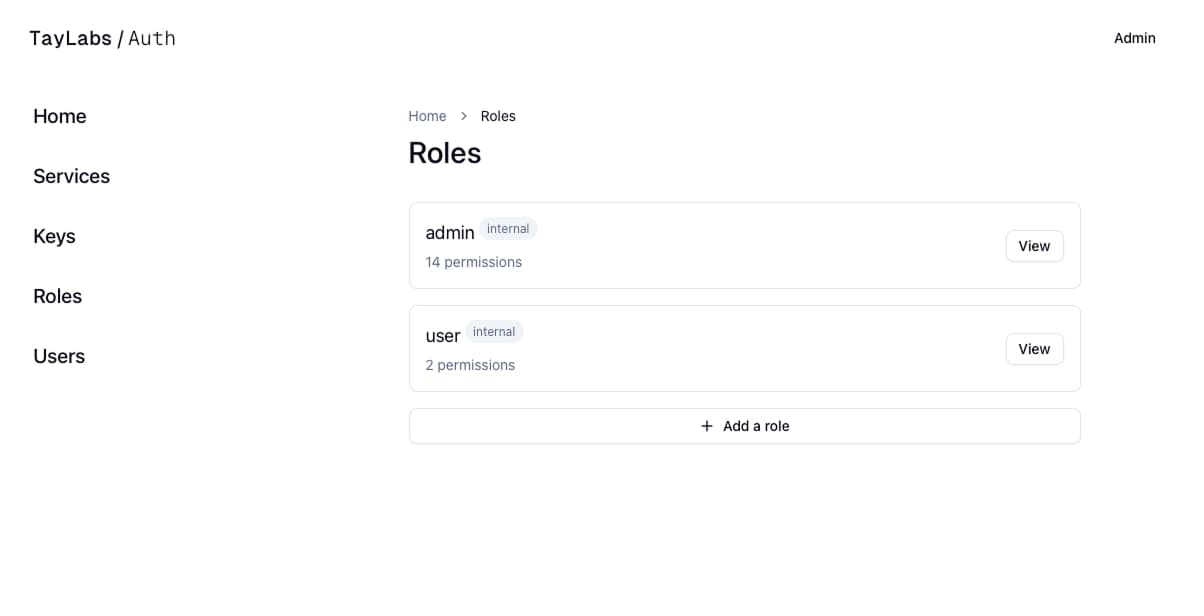 Figure 2: Dashboard page showing all the roles that exist in the configured environment
4. Technical Decisions
Drizzle ORM over Prisma
I chose Drizzle ORM for its explicit, SQL-close query model. The schema is defined in TypeScript, migrations are plain SQL files I can read and version, and the type inference from schema to query result is tight without needing a separate type-generation step.
Redis for Session Whitelisting
Being that a session whitelist was needed, Redis was the clear winner for increased speed and scalability. Each time the refresh token was used, a read and updated had to be made to keep things updated and secure, along with storing session data to allow for the logout of all or specific device features.
Zod for Input Validation and Type Inference
Every request body, URL param, and query string passes through a Zod schema before reaching a controller. This was done to prevent an unintended updates to fields that weren't meant to be updated, along with displaying helpful error messages when a required field was left out.
1// src/auth/dto/signup.dto.ts (simplified)
2
3const signupBodySchema = z
4  .object({
5    firstName: z.string(),
6    lastName: z.string(),
7    email: z.email(),
8    password: passwordValidation,
9    passwordConfirm: z.string(),
10    linkBaseUrl: z.url().refine(
11      (url) => url.startsWith(env.FRONTEND_URL),
12      'Invalid link base URL'
13    ),
14  })
15  .refine((data) => data.password === data.passwordConfirm, {
16    error: 'Passwords do not match',
17    path: ['passwordConfirm'],
18  });
19
20type SignupReqBody = z.infer;
The validate middleware wraps Zod parsing and returns a structured 400 response on failure, so controllers can assume their inputs are already safe.
Environment Validation at Startup
Rather than letting misconfigured environment variables cause cryptic runtime errors, the entire process.env is parsed through a Zod schema at boot. If any required variable is missing or malformed, the process exits with a descriptive error listing exactly which variables failed and why. This saved countless hours while developing, and should save many more during deployment and usage.
1// src/types/env.ts (simplified)
2
3const envSchema = z.object({
4  DATABASE_URL: z.url(),
5  ACCESS_TOKEN_SECRET: z.string().min(6).max(24),
6  REFRESH_TOKEN_TTL: z
7    .string()
8    .regex(/^\d+(h|d)$/)
9    .transform((str) => str as `${number}${'h' | 'd'}`),
10  // ...
11});
12
13try {
14  env = envSchema.parse(process.env);
15} catch (error) {
16  // pretty-print the error tree and exit
17  process.exit(1);
18}
5. Database Design
The schema spans 11 tables, with migrations managed by Drizzle:
| Table | Purpose |
|---|---|
users | Core user identity: email, password hash, 2FA flags |
profiles | Generic profile information: name, username, bio, avatar |
devices | Per-device session tracking with metadata (IP, OS, browser) |
totp_tokens | Encrypted TOTP secrets for Two-Factor authentication |
password_resets | HMAC token hashes for in-flight reset requests |
linked_oauth | OAuth provider account links (Multi provider support, though Not yet implemented) |
roles | Named permission groups; is_external guards seeded roles |
permissions | Namespaced permission keys per service |
services | Registered services to validate permissions properly |
role_permission | Many-to-many: roles and permissions |
user_role | Many-to-many: users and roles |
All foreign keys cascade deletes appropriately - deleting a user removes all their devices, sessions, TOTP tokens, and role assignments in one operation, keeping data normalized and clean.
6. Security Model
Threat Surface Considered
- Credential stuffing - rate limiting on
/login(5 req / 5 min per IP), Redis-backed withexpress-rate-limit - Token theft - refresh tokens are
HttpOnlycookies; device ID and device type are validated on every refresh to catch tokens used from a different context - CSRF -
csurfmiddleware active on all state-mutating routes in production; CSRF token endpoint at/api/v1/auth/csrf - Brute-force on TOTP - TOTP validation goes through the standard auth rate limiter; codes are verified without timing side-channels via
otplib - Secret exposure in DB breach - TOTP secrets encrypted at rest (AES-256-GCM); passwords hashed with Argon2id; reset tokens stored as HMAC hashes, never plaintext
- Privilege escalation via seeded roles -
is_external: falseon seeded roles prevents them from being modified or deleted via the API even by admin users - Dependency confusion / supply chain - minimal dependency surface, no ORM with native binary dependencies except
argon2(vendored build vianode-gyp)
What's Explicitly Out of Scope (for now)
- SMS / phone-based 2FA (schema is prepared,
phoneTwoFactorEnabledexists, implementation deferred) - OAuth login flow (account linking schema exists; the actual OAuth callback routes are not yet implemented)
7. A Few Challenges I Faced
Challenge: Multi-service permission namespacing
I wanted a single auth service to gate access for multiple downstream services (an API keys service, a mail service, and any other custom services that used the auth service), each with their own permission vocabulary and the ability to re-use a permission name (i.e. user.read).
Solution: Permissions are stored with a service_id foreign key and a key column. Scopes in the JWT are serialized as serviceName:permissionKey (e.g. auth:user.read, test:user.read). The authenticate middleware checks {serviceName}:{permission} by default, so services can validate tokens issued by the same auth service using their own namespace.
Challenge: Seeded data that must survive restarts
The admin user and default roles need to exist in the database from the first run, and their permissions need to stay in sync when the service restarts without blindly overwriting user changes.
Solution: The seed script runs inside a transaction on every startup. For roles, it computes the diff between the desired permission set and the current state, then inserts additions and deletes removals. The onConflictDoNothing / onConflictDoUpdate pattern handles initial inserts safely incase seed data was inserted beforehand.
Challenge: Device-aware session management
I wanted a logout to be per-device (so logging out on mobile doesn't kill your desktop session), while also being able to logout a certain device if credentials had been compromised.
Solution: Each login creates a row in the devices table with a sessionId that maps to a Redis key. The _selected_s cookie tells the client which session is "active." Logout uses the deviceId cookie to look up the session and delete it from Redis. While invalidateAll updates every device row for the user and deletes all their associated Redis entries
8. What I'd Do Differently
Use sessiong based auth over JWT pairs With the current requirements of revoking specific sessions, or all sessions. Using JWT tokens add too much development complexity (having to refresh the token when it expires, dealing with race conditions, etc.) while the session whitelist defeats the main purpose of using a JWT pair.
9. Outcomes & Takeaways
Building this project gave me a much deeper understanding of Authentication concepts, why it can be so dangerous to roll-your-own auth, and taught me about Micro-service and Clean architectures. While I may not use this for many projects due to the recent creation/popularity of better-auth, it taught me a lot about numerous development and system architecture concepts and would definantly do it again.
What I came away with
- A strong practical grasp of JWT security - The difference between stateless verification and revocability, why refresh token rotation matters, and how to model pending auth states cleanly
- Real experience with Drizzle ORM at a non-trivial schema size, including migrations, transactions, conflict resolution, and query composition
- A working mental model for RBAC that extends across service boundaries without coupling services to each other
- Appreciation for environment-level validation - the Zod env schema has already caught misconfiguration mistakes that would have been confusing runtime bugs and saved many hours of headaches
Links
- GitHub: github.com/TayLabs/Auth
- Preview: taylabs.taylorkelley.dev